
Most sales pitches for AI in Project Management are built for a 500-person operations team with a dedicated PMO on staff. Autonomous agents handling task execution. Predictive risk scoring across a portfolio of 40 concurrent projects. An implementation timeline measured in months.
If you're running a six-person team that's also doing client billable work, none of that applies to you. It was never meant to. Small businesses don't need software built for enterprise complexity. They need fewer status meetings, fewer dropped tasks, and earlier warning when something is about to become a client problem.
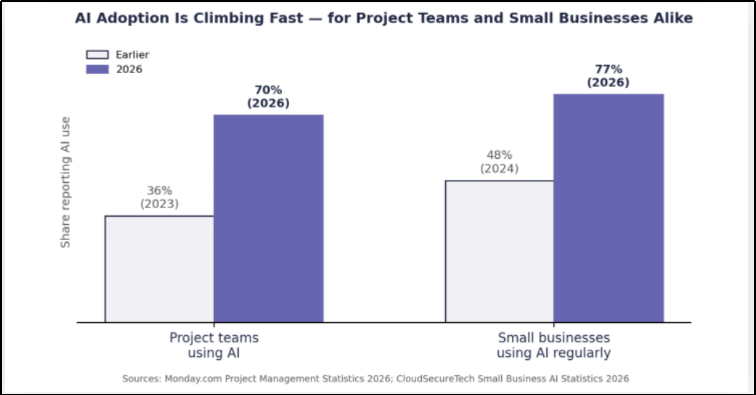
That's a much lower bar, and AI already clears it for teams our size. Adoption inside project teams has nearly doubled in two years- 70% of project professionals now say their organization uses AI in some form, up from 36% in 2023, and small businesses are moving just as fast, with 77% now using AI regularly, up from 48% less than two years ago. Below is what that looks like day to day, not the version built for a Fortune 500 project office.
Most small organisations already own a project management tool. What they're short on is time to keep it updated. Somebody has to chase down status, turn it into a report, and figure out what's actually behind schedule. Usually that person is also billing hours to clients, so the update work gets squeezed in late on a Friday or skipped entirely.
AI helps here not by adding a new dashboard, but by taking over the parts of tracking that never required judgment to begin with. Pulling status from task comments. Catching a deadline that's slipping before the client notices. Turning a week of scattered Slack messages into three lines a project lead can actually read in the morning.
The useful version of this technology isn't “AI runs your projects.” It's AI clearing out the busywork that keeps you from running them well yourself.
The best return on AI for a small team is compiling information, not making decisions with it. Have it pull together what moved this week, what stalled, and where a client is waiting on a reply. Hand that to whoever's leading the project instead of making them dig through an inbox. The call on what to do about any of it still belongs to a person- the time saved is in not having to gather the facts first.
You don't need the kind of predictive modeling a construction firm uses to track five job sites at once. A flag is enough: a task that's been open twice as long as it was scoped for, or a project whose task count has quietly outgrown the original quote. Most project management tools already ship lightweight versions of this. The part teams usually get wrong isn't the feature- it's ignoring the alert once it fires.
If your team spends real hours writing status updates before every client call, AI-generated first drafts pulled straight from project data turn that into editing rather than writing. It sounds minor until you add up the hours across a month. For a service business, those are hours that go back into billable work.
Small teams tend to hand out work based on who happens to be free to talk, not who has real capacity. Basic AI-assisted assignment- already built into tools like Asana, ClickUp, and Monday- looks at current workload before suggesting who takes the next task. It's a small feature. It's also usually the difference between one person quietly burning out and a team that's carrying the work evenly.
None of these are the enterprise platforms the intro warned you off. They're the tools small teams already use day to day, with AI features that ship in affordable plans, not a six-figure rollout. Prices below are per user, per month, checked against vendor pricing pages in 2026.
Trello's free plan covers unlimited cards, 10 boards, and basic automation, which is plenty for a team of two to five just getting organized. The Premium tier ($10/user/month) adds AI-assisted writing suggestions through Atlassian Intelligence, plus calendar and dashboard views. It's the simplest option here, and the one to pick if your team has never used a PM tool before.
ClickUp's paid plans start at $7/user/month (Unlimited) and $12/user/month (Business), both well under what most “enterprise” tools charge. ClickUp Brain, its workspace-wide AI assistant, is a $9/user/month add-on that can summarize threads, draft updates, and answer questions pulled from your own tasks and docs. The trade-off is a steeper learning curve than Trello- ClickUp packs in a lot of configuration.
Asana's Starter plan runs $10.99/user/month and includes AI Studio, a no-code builder that lets you set up simple AI workflows, such as drafting a project brief or suggesting a task owner based on who has capacity. It suits teams that already think in terms of goals, timelines, and dependencies, and want the AI layered on top of that structure rather than replacing it.
monday.com's Basic plan starts at $9/seat/month (3-seat minimum), with AI features such as automatic status summaries, categorization, and pulling data out of uploaded files like invoices or contracts. It's more visual than Asana or ClickUp, which makes it a reasonable fit for teams that also run content calendars or lightweight CRM work alongside projects.
Teamwork.com's Basics plan is $9.99/user/month and is the only tool on this list built specifically around billable client work: time tracking, invoicing, and AI comment summaries come standard. The Accelerate tier ($24.99/user/month) adds AI-assisted workload forecasting and profitability tracking per client. For a marketing or services team billing hours, as opposed to a product team shipping features, this is the closest fit to how the work actually gets paid for.
Any of these will outgrow a spreadsheet fast and none require a procurement process. Start with the free tier of whichever one fits your workflow, turn on one AI feature, and see what it actually saves before paying for more.
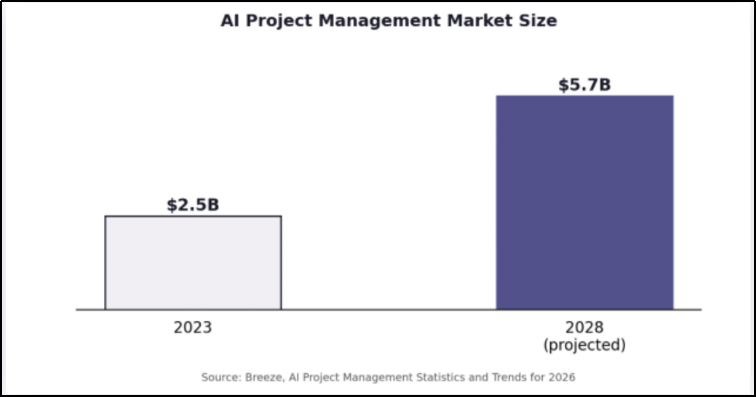
Not every AI feature marketed at project teams is worth turning on at small-business scale. Fully autonomous agents that execute work without review, portfolio-wide optimization across dozens of projects, governance layers built for compliance teams- these solve problems that show up once you're running many concurrent projects with multiple PMs. It's worth remembering that most of the AI project management market's growth, projected to roughly double from $2.5 billion in 2023 to $5.7 billion by 2028, is being built for exactly that scale, not a six-person team. At six or ten people, those features add setup time without much payoff yet. Start with what removes admin work you're already doing by hand, and revisit the rest once you've outgrown the basics.
Cleaner delivery has a direct line to growth for a B2B services business. An account based marketing agency or a b2b advertising agency that hits deadlines and reports clearly keeps accounts longer than one that's constantly explaining a slip. The same discipline that keeps a project on schedule is what keeps a content marketing strategy for b2b clients consistent month over month instead of bursty when someone finally has time for it.
It shows up in other places too. Teams that claw back hours through better project workflows tend to spend that time on the work that actually grows accounts- building out answer engine optimization for client sites, staying on top of social media management services, or testing new creative as a social media advertising agency. AI for project management isn't the goal on its own. It's what buys back the time to do that other work properly.
You don't need a new stack to start using AI in your project workflow. Most small teams already have access to features they've never turned on inside the tools they're paying for. A reasonable starting point:
● Turn on the AI status or reporting features already sitting inside your current PM tool.
● Set one or two alerts for timeline or scope creep before trying to automate everything at once.
● Use AI drafting on recurring client updates before handing it anything more complicated.
● Check what it produces for a few weeks before trusting it to run without review.
Small, deliberate changes beat a full platform switch, especially for a team that can't afford a month of downtime while everyone relearns new software. It also tends to show up on the bottom line fast- small businesses already using AI in daily operations report saving 20 or more hours a month, with many saving between $500 and $2,000 monthly once the tools are actually in use.
Not sure where to start with AI in your own project workflow?
Talk to Rovert Digital about what's actually worth automating for a team your size.
1. Do small businesses actually need AI for project management, or is it just a trend?
It earns its place when it removes real admin work - status updates, reporting, task tracking. If your team loses hours each week assembling that manually, AI project management features pay for themselves fast, even under ten people.
2. What's the cheapest way to add AI to my project management?
Look at what you already pay for first. Asana, ClickUp, and Monday all ship AI features - status summaries, smart task suggestions - inside existing plans or as low-cost add-ons. New software usually isn't necessary.
3. Can AI replace a project manager on a small team?
No. It can compile updates, flag risk, and draft communications, but decisions about scope, priorities, and the client relationship still need a person. It removes admin work, not the role.
4. How is AI for project management different for a small team versus an enterprise one?
Enterprise tools lean on portfolio management and autonomous agents across large teams. Small teams get more from simpler features: status rollups, deadline alerts, drafting help - things that save time without adding a new layer to manage.
5. Will AI project management tools work with the software I already use?
Most likely. The major PM platforms have added native AI features over the past year, so switching usually isn't the first step. Turning on what's already in your current plan is.


